DVD-quality lessons (including tabs/sheet music) available for immediate viewing on any device.
Take your playing to the next level with the help of a local or online banjo teacher.
Weekly newsletter includes free lessons, favorite member content, banjo news and more.
Premier Sponsors


|
Please note this is an archived topic, so it is locked and unable to be replied to. You may, however, start a new topic and refer to this topic with a link: http://www.banjohangout.org/archive/344348
Page: 1 2
janolov - Posted - 07/08/2018: 00:19:29
I have used TablEdit in almost 12 years and I do like it. Some people mention Musescore as another tab program, so I have began to wonder what is the difference between the two from a musician's perspective?
Richard Hauser - Posted - 07/08/2018: 07:46:06
I have owned both. Musescore documentation is much better than TablEdit documentation. So far I have had more success answering questions from your index than I have the Tabledit Users Guide.
Edited by - Richard Hauser on 07/08/2018 07:50:12
n1wr - Posted - 07/08/2018: 08:05:20
Jan - I am also a TablEdit user. I don't know much about Musescore, but I do know that the tef file standard seems to be the standard format we use. Can files be exported from Musescore in that, or a compatible format?
Not to hijack your post, but it is rather annoying when I see TABs posted in pdf's - they loose half of their value - that is seeing the TABs in print is different than being able to use them to learn, playing along, slowing them down, etc. I have actually taken pdf'd TABs and entered them into TablEdit so I could better use them.
Jack Baker is probably the guy to ask here. He does marvelous things with TablEdit.
kmwaters - Posted - 07/08/2018: 08:17:48
Agreed on the manual issue. For some reason Tabledit has not put much effort into a top notch manual. But the paid version of the program is really good.
Jack Baker - Posted - 07/08/2018: 10:21:20
I've used both and Tabledit is far superior and has a far better midi. There is really no need for discussion. Either use Tabledit or Musescore. Putting down one or the other is senseless to me. This constant bickering is silly at best...Jack p.s. Use one or the other and enjoy the Summer...
Edited by - Jack Baker on 07/08/2018 10:24:16
loonsailor - Posted - 07/08/2018: 10:28:30
I don't know TablEdit, except as a user of TefView, so please excuse and correct any misunderstandings I may have regarding it, but...
MuseScore is a full music notation system, similar to Finale or Sibelius. Unlike those expensive packages, MuseScore is free and open source. Like those packages, it's capable of multiple instruments, pretty much any kind of full music notation, typesetting, etc. You could write a symphony in any of them, enter all the parts (different instruments in different keys), print out each part and a conductor's score, etc. It has all the special stuff you might need for piano, or bagpipes, or harpsichord, or whatever. As of the version 2 (it's currently on 2.3), it also has really nice, easy to use tablature capabilities.
So, to answer the original question, the difference from a "musician's perspective" is that they're very different packages, with MuseScore being much, much richer and more complete. To answer from a "banjo player's perspective", though, they might not be that different (unless you plan on scoring for banjo and oboe or something). So, it might come down to simply which one is easier for you to use and/or produces nicer tab.
I can't compare, since I haven't used TablEdit, but I find MuseScore very easy and flexible. Rather than describe the whole experience, it might be easiest to check out this tutorial, or one of the many others. Although that tutorial shows a full score, adding a tab part for one instrument, it's quite easy to simply make a tab-only chart. It's already all set up for banjo, and most any other instrument you can think of. It took me about an hour to learn it (starting having never used MuseScore) and now it's quite quick.
MuseScore can export pdf charts, of course, and also a number of other formats, of which MusicXML is probably most important. I imported a banjo chart from MuseScore as MusicXML and imported into Finale, and was amazed to see that it looked perfect, both the standard notation and the tab. It can also import, but not export, GuitarPro files.
So, if you're interested, check out any of the numerous youtube videos, or just download it - it's completely free, runs on Mac, Windows and linux.
BTW, I just watched Bela Fleck's "How to Write a Banjo Concerto" on amazon, and really enjoyed it. He uses Sibelius and does a quick demo in the movie of how it works for him. Sibelius and Finale are the two leaders in this kind of software but they're both >$600 for full packages. MuseScore is probably not their equal (yet), but it's pretty close, very nice to use. And, did I mention, free?
phb - Posted - 07/09/2018: 01:58:01
For me the decisive factors probably don't matter to most of you: MuseScore is free and MuseScore runs on Linux (and, of course, on Mac and Windows). Personally I don't care for the MIDI feature. If I want to know what a tune sounds like, I will load it into a slow-downer and look at the tabs while the tune plays. In the end you don't want to sound like a computer but like the real thing, right?
I might say that I am not too happy about .tef files being the standard in the Tabs Archive and would prefer pdfs by far as I can look at them anywhere (on my phone, on my office computer where I'm not allowed to install any software) and don't need a special program to do so. TabView does run in wine on my Linux computer so I can use the tef tabs, too, but I just prefer the look of some cleanly set sheet music (the ugly looks of TabView may be caused by my wine setup, I don't know).
Anyway, the tabs in the Tab Archive are like not only a free meal but rather like a free all-you-can-eat buffet. It's all great and I wouldn't worry too much about the software question. Since MuseScore is free, you can just have a look at it yourself.
Mooooo - Posted - 07/11/2018: 10:46:20
I am a MuseScore fan so of course I agree with what the other MuseScore guys say. I also agree with Jack when he says "Either use Tabledit or Musescore. Putting down one or the other is senseless to me. This constant bickering is silly at best...Jack p.s. Use one or the other and enjoy the Summer...I thought it was very funny that he started this statement with "I've used both and Tabledit is far superior and has a far better midi. There is really no need for discussion."
I guess there may be a need for discussion
Jack Baker - Posted - 07/11/2018: 11:07:48
Your post is so funny to me Mike,
Tabledit is far superior to "Me" but not for you and others. Simple as that and there really is no more need for discussion....Jack
Edited by - Jack Baker on 07/11/2018 11:09:30
Jack Baker - Posted - 07/11/2018: 12:23:46
Keep your tabs coming Mike as my students even use them now....Jack
Peter Vipulis - Posted - 07/11/2018: 16:31:04
I like TablEdit, just punch in the numbers.
Haven't used musescore for banjo, but for something else. I like Musescore because it isn't static and people can search your music and vice/versa.
One thing about TablEdit it is a little pricey. I expected it to be $30 or so when I went to the site. However, I do like how it prints, widely spaced, which helps with sight reading. My 2 cents.
trapdoor2 - Posted - 07/17/2018: 14:28:51
I have been a Tabledit user for longer than I can remember. I've got something like 400 classic banjo scores in TablEdit...which includes a lot of 1st and 2nd banjo parts (and a lot of time).
That said, TablEdit has limitations (every program has limitations). A few years ago, it seemed like every score I chose unveiled another problem that TablEdit could not address. I'd have to figure out a work-around or simply not do that score. Meh. It is still a great program.
However, I always keep my ear to the ground for a better mousetrap. I found Musescore. It's free, so it was a no-brainer to give it a go.
I started out Musescore with Viola scores. I needed something quick and dirty that I could use to clean up horribly dim and hard to read sheet music that had been xeroxed almost to death. Musescore's note-entry is extremely user friendly, esp. working from the keyboard. You simply type the note letter (A thru G). I found I could enter a page full of notation in about half the time it takes in TablEdit. Big plus, typing the note names helped me with my sight-reading in the Alto clef.
Maybe 6 months ago, I started experimenting with Musescore's Tab section. For direct Tab entry, it is much less user-friendly than TablEdit. I'm sure I could learn to use it. For Tab conversion from notation, it has a much better algorithm for building Tab than TablEdit ever had. With faster notation entry and better conversion to Tab, I spend less time correcting conversion errors.
So...I like Musescore a lot. The software is completely open, so every aspect is available for change/modification. I can change the length of the note stems, the size of the flag, etc., etc. Some things are less simple. I really got used to TablEdit's system of repeats and jumps. Took me some study and some trial/error to use Musescore's system...but it is there and it does work. Just different. Musescore handles voices easier and more intuitively than TablEdit.
Musescore gets props for layout and formatting. Much more control, easier to use (for my application), cleaner results. I do also have to mention that their online forum is much more accessible than TablEdit's yahoo group (even though the TablEdit group has been of great help over the years). Online help documentation is very nice...but a little obtuse. The documentation search engine sometimes has trouble finding what you want...even if you use the correct words.
I tested myself with a Classic Banjo piece a few weeks ago. 60-something measures of a polka (A-B-Trio) keyed into Musescore, converted to Tab, cleaned up, formatted and exported to .pdf. That took me less than 45min. The same piece in TablEdit took me an hour to do just the A and B parts. As I said above, direct Tab entry would be just the opposite: faster in TablEdit.
Just a week or two ago, I learned a new trick in Musescore. How to handle dotted rhythms. This has been the bane of my TablEdit existence for many years. You have to switch back and forth between note values so much that it takes simply forever to key in a single page of it. In Musescore, there is a "note replacement mode". Basically, you key the rhythm in via note values...but just use one note (I use B, the middle line in the treble clef). Cut and paste to fill out the score. Then switch to Note Replacement and start typing the note names. It jumps to the next note and automatically takes the value, replacing only the note's name. Brilliant! I can do an Irish jig in, well, jig time!
Musescore also takes the graphic interface prize. Cleaner, easier to zoom in and out, WYSIWYG. If you have a score with parts (like an orchestral score), it generates separate parts easily.
I am pretty much converted to Musescore for my application (conversion of notation to Tab). I'm working on converting all my old .tef files to .mscz
n1wr - Posted - 07/17/2018: 14:46:39
trapdoor2 Does Musescore export in .tef format? If you write a score in TAB in Musescore, then export it in ,tef format (if possible) does it play in TablEdit OK? How does it do with adding other instruments to a score (bass, guitar backup, etc)?
That's a good comparison you wrote. Thanks.
Jack Baker - Posted - 07/17/2018: 15:15:05
Wayne,
Musescore does not have a midi and that's what most people want and need. As far as the printout, I don't see a lot of difference. Just a matter of being able to write a complete score with all the different clefs. I don't think that 99% percent of people on BHO will ever use or need a complete score....Jack p.s. I've always had Musescore on my computer but never need to use it. ....pps. Musescore does not export to Tef...because Tef files all have midis...
Edited by - Jack Baker on 07/17/2018 15:16:10
Mooooo - Posted - 07/17/2018: 15:29:33
Jack, Musescore does have a midi. You can input notes via keyboard using a midi connection and you can also export midi files. I always wonder why you say it doesn't. Maybe I don't understand what you mean by midi, can you please explain?
trapdoor2 - Posted - 07/17/2018: 15:40:31
quote:
Originally posted by n1wrtrapdoor2 Does Musescore export in .tef format? If you write a score in TAB in Musescore, then export it in ,tef format (if possible) does it play in TablEdit OK? How does it do with adding other instruments to a score (bass, guitar backup, etc)?
That's a good comparison you wrote. Thanks.
@n1wr , no, Musescore does not export to .tef, nor does it read .tef files. However, it does export to .xml, musicxml, etc. You could probably save it to .xml and import it into TablEdit, clean it up (file conversions are often lossy) and then save it as .tef. I'll have to try that, I've only done it .tef>.xml>.mscz, not the reverse,
And yes, Musescore has a fine MIDI interface. It will output to a variety audio formats including MIDI, mp3, FLAC, Ogg and wave. The banjo MIDI sounds better in Musescore than in TablEdit (IMNSHO) but still not a very good banjo synth. I usually export to .mp3 using the Grand Piano synth.
Mooooo - Posted - 07/17/2018: 15:50:27
trapdoor2 have you heard the Kay Banjo soundfont? It's banjo-y, not perfect of course, but I wouldn't want or need it to be, if I want to hear banjo, I pick mine up. If you want to try it, I can dig it up and pass on the link.
Edited by - Mooooo on 07/17/2018 15:51:25
trapdoor2 - Posted - 07/17/2018: 16:07:08
quote:
Originally posted by Moooootrapdoor2 have you heard the Kay Banjo soundfont? It's banjo-y, not perfect of course, but I wouldn't want or need it to be, if I want to hear banjo, I pick mine up. If you want to try it, I can dig it up and pass on the link.
Mooooo I just uploaded two .mp3s exported from Musescore to my .mp3 files: "The Hazers" (one banjo, one piano) banjohangout.org/myhangout/mus...p?id=3288
No, I haven't heard the Kay Banjo soundfont. I'd love to hear it.
Edited by - trapdoor2 on 07/17/2018 16:10:20
Jack Baker - Posted - 07/17/2018: 16:13:50
Mike,
I get what you're saying. Could you please attach a simple banjo or guitar file made with Musescore with midi here so I can see and hear it?...Jack
Originally posted by MoooooJack, Musescore does have a midi. You can input notes via keyboard using a midi connection and you can also export midi files. I always wonder why you say it doesn't. Maybe I don't understand what you mean by midi, can you please explain?
Edited by - Jack Baker on 07/17/2018 16:16:42
trapdoor2 - Posted - 07/17/2018: 16:32:53
quote:
Originally posted by Jack BakerMike,I get what you're saying. Could you please attach a simple banjo or guitar file made with Musescore with midi here so I can see and hear it?...Jack
Originally posted by MoooooJack, Musescore does have a midi. You can input notes via keyboard using a midi connection and you can also export midi files. I always wonder why you say it doesn't. Maybe I don't understand what you mean by midi, can you please explain?
Here you go, Jack.
Jack Baker - Posted - 07/17/2018: 17:01:47
Yes,
I understand about the midi Mike but can you display a tab and a midi at the same time? I like that Tabledit lets you hear the file with the midi embedded and you don't have to create a separate midi file...
I admit I haven't fooled with Musescore in a long time...I prefer the Tabledit midi for my own reasons, mainly that I can adjust my midi for different sounds...Jack....It really gets down to what you prefer. I do prefer the midi quality of Tabledit though. But thank you for the post Mike..
Edited by - Jack Baker on 07/17/2018 17:08:54
trapdoor2 - Posted - 07/17/2018: 17:49:50
quote:
Originally posted by Jack BakerYes,
I understand about the midi Mike but can you display a tab and a midi at the same time? I like that Tabledit lets you hear the file with the midi embedded and you don't have to create a separate midi file...
I admit I haven't fooled with Musescore in a long time...I prefer the Tabledit midi for my own reasons, mainly that I can adjust my midi for different sounds...Jack....It really gets down to what you prefer. I do prefer the midi quality of Tabledit though. But thank you for the post Mike..
Jack, the hangout system won't let me upload a Musescore file...not supported. However, it runs MIDI functionally just like TablEdit. You see the Tab/score and there's a player that scrolls thru the Tab while playing, etc. You can select sections to repeat for practice, set the speed to anything you want, change the sounds, import soundfonts for more sounds, etc. You don't have to create a separate file to play the tune...unless you want to send the audio to someone.
Let's see if this link works: musescore.com/user/8429266/scores/5125361
This is a banjo and banjeaurine duet I did back in early June called "Mountain Stream Polka", came from the Dobson National Banjo Method published in the 1890's. What you see is a 'bare bones' player for Musescore. Of course, the full program has many more controls, bells, whistles, etc.
Edited by - trapdoor2 on 07/17/2018 17:51:40
Mooooo - Posted - 07/17/2018: 17:57:10
Jack, since BHO won't allow the file we can't share our MuseScore scores with everyone, only pdfs and mp3 and maybe midi files. If we could you would be able to hit the play button and see the notes highlighted note by note as the score plays. It's the same as TablEdit in this regard. Maybe you haven't tried it for a while, of course it will be some work to get used to a new system and may not be worth it for you. Stick with what you like. It's no big deal. I make no money from MuseScore, I really like the program. I just wish I could minipulate the 5th string to reflect how banjo players refer to the frets.
trapdoor2, here's the Kay Banjo soundfont that i got from dr4dpet: Kay 5-String Banjo Soundfont, and here's how to install it in case you forgot or someone else wants to try it: how to install
Here's how it sounds, not the greatest, but not so bad either:
Edited by - Mooooo on 07/17/2018 18:10:59
Jack Baker - Posted - 07/17/2018: 18:05:45
Oh Yeah,
Nice arrangement too .....Jack
Originally posted by trapdoor2quote:
Originally posted by Jack BakerYes,
I understand about the midi Mike but can you display a tab and a midi at the same time? I like that Tabledit lets you hear the file with the midi embedded and you don't have to create a separate midi file...
I admit I haven't fooled with Musescore in a long time...I prefer the Tabledit midi for my own reasons, mainly that I can adjust my midi for different sounds...Jack....It really gets down to what you prefer. I do prefer the midi quality of Tabledit though. But thank you for the post Mike..Jack, the hangout system won't let me upload a Musescore file...not supported. However, it runs MIDI functionally just like TablEdit. You see the Tab/score and there's a player that scrolls thru the Tab while playing, etc. You can select sections to repeat for practice, set the speed to anything you want, change the sounds, import soundfonts for more sounds, etc. You don't have to create a separate file to play the tune...unless you want to send the audio to someone.
Let's see if this link works: musescore.com/user/8429266/scores/5125361
This is a banjo and banjeaurine duet I did back in early June called "Mountain Stream Polka", came from the Dobson National Banjo Method published in the 1890's. What you see is a 'bare bones' player for Musescore. Of course, the full program has many more controls, bells, whistles, etc.
Edited by - Jack Baker on 07/17/2018 18:06:46
Jack Baker - Posted - 07/17/2018: 18:08:49
Good Mike,
I like it too, save the midi sound :-)....J
Originally posted by Moooootrapdoor2, here's the Kay Banjo soundfont that i got from dr4dpet: Kay 5-String Banjo Soundfont, and here's how to install it in case you forgot or someone else wants to try it: how to install
Here's how it sounds, not the greatest, but not so bad either:
Mooooo - Posted - 07/17/2018: 18:16:30
Jack Baker
Jack, I ammended my previous post to include a message for you but you already answered, please check it out again. Thanks, Mike
*Now I see Trapdoor said many of the same things.
Edited by - Mooooo on 07/17/2018 18:17:46
Jack Baker - Posted - 07/18/2018: 00:44:37
I've got nothing more to add to this. Some like and use Musescore and some prefer Tabledit and its ease of functions with no extra functions needed to hear the midi etc. In other words, once a Musescore is displayed, it's finished and no alternations can be made. either with the tab or the midi. This is exactly why I prefer Tabledit--it's interactive and more interactive...play on....Jack
Edited by - Jack Baker on 07/18/2018 00:47:11
phb - Posted - 07/18/2018: 02:18:07
quote:
Originally posted by Jack Bakerno extra functions needed to hear the midi etc. In other words, once a Musescore is displayed, it's finished and no alternations can be made. either with the tab or the midi. This is exactly why I prefer Tabledit--it's interactive and more interactive...play on....Jack
There are no extra functions needed to set up MuseScore to play tabs as midi. And I'm not sure what you are trying to say with "no alternations can be made". Do you mean to a pdf exported from MuseScore? If MuseScore users were allowed to upload MuseScore files to the tab archive, you could just as well modify them. This is purely a limitation of the BHO.
Jack Baker - Posted - 07/18/2018: 08:27:58
I'm done. Enjoy Musescore if it works better for you...I have my own reasons and that's why my tabs are usually enjoyable...Jack
phb - Posted - 07/18/2018: 08:34:48
Your tabs are enjoyable because you are a great experienced and generous transcriber. Anybody is well advised to use whatever it needs to use your tabs.
Jack Baker - Posted - 07/18/2018: 13:01:12
Thanks Phillip,
From what you, mike and others say, it's a toss up as to which program works best. As long as people get what that want and need....Jack
Peter Vipulis - Posted - 07/18/2018: 16:09:27
Musescore is still not as friendly to read. Even GuitarPro doesn't have what TablEdit has as far as printing. The sheet music is what I think is needed most.
I don't think Musescore can immediately play MIDI files. It has to render them into a mp3 or similar type of file which is what you hear play. If I took a TablEdit Midi file and assigned professional samples to it, it would sound similar. Therefore I think TablEdit can play more immediately in that way, which might be better if transcribing. Correct me if I'm wrong.
This is like Mac vs PC :)
Edited by - Peter Vipulis on 07/18/2018 16:11:02
Peter Vipulis - Posted - 07/18/2018: 19:13:43
I should experiment before I post. I just imported a midi file into musescore and it plays fine, sorry I was at work. It did break it up into several staves though.
However, I did experiment with some banjo/guitar/bass samples for those curious.
Edited by - Peter Vipulis on 07/18/2018 19:18:46
trapdoor2 - Posted - 07/19/2018: 09:47:57
quote:
Originally posted by Peter VipulisMusescore is still not as friendly to read. Even GuitarPro doesn't have what TablEdit has as far as printing. The sheet music is what I think is needed most.
I don't think Musescore can immediately play MIDI files. It has to render them into a mp3 or similar type of file which is what you hear play. If I took a TablEdit Midi file and assigned professional samples to it, it would sound similar. Therefore I think TablEdit can play more immediately in that way, which might be better if transcribing. Correct me if I'm wrong.This is like Mac vs PC :)
Yes, Mac v PC is pretty apt. Readability is no different than TablEdit, you get what you set it up to do. Musescore allows more control over all the little things than TablEdit. I can actually change the thickness of each individual staff line if I want to (which is crazy...but it can be done). No different than any competing software, some things are great in one and not in the other. After 6+ months of trial, I'm switching over to Musescore (better suited to what I do).
One thing I haven't compared between the two is their ability to import ABC files. I remember doing that in TablEdit years ago but for some reason I remember it being a PITA (IIRC, you have to have ABC in a file with an .abc or .txt extension). Will have to revisit TablEdit. In Musescore, a window pops up and you cut 'n' paste your ABC text into the window. Poof! You get nice, neat notation. For websites like thesession.org/tunes, you can bang thru a dozen ABC variations really quickly without the intermediate step of putting them into a file format TablEdit can read.
My perfect software would read (OCR) notation reliably and save it to an editor (like TablEdit or Musescore). I have tried numerous music OCR softwares, none fill the bill...yet!
Mooooo - Posted - 07/19/2018: 15:22:14
MuseScore needs some work, but it is getting better all the time and it's free.
Peter Vipulis - Posted - 07/19/2018: 16:24:54
Thanks. I'll try to work with the print settings on Musescore and see what happens. For me I don't want to waste time squinting :) Don't think I'll have a reason to switch at the moment because I own Finale.
As far as score/music recognition I recently bought music-to-xml. (musitek.com/m2xml.html) It works ok, not as great as hoped. I was thinking I could grab images from the net but I'm thinking its probably best for scanning what I have already. It exports directly to Finale if needed.
Peter Vipulis - Posted - 07/19/2018: 20:11:20
I tried a banjo tab, but how do you connect the stems to the numbers? This is the most legible I could make it.
Mooooo - Posted - 07/19/2018: 20:48:21
quote:
Originally posted by Peter VipulisI tried a banjo tab, but how do you connect the stems to the numbers? This is the most legible I could make it.
To connect the stems to the numbers:
select a measure then right click > select Staff Properties > select Advance Style Properties > select Note Values > on Half Notes choose None, then select Through Staff on Stem Style. Click OK, Apply then OK and that's it. It takes a bit of time to figure out where to look for some things, but eventually you will know where to look.
Good luck.
Mooooo - Posted - 07/19/2018: 20:51:04
Here's the MuseScore Handbook, it might answer some questions.
Mooooo - Posted - 07/19/2018: 21:23:47
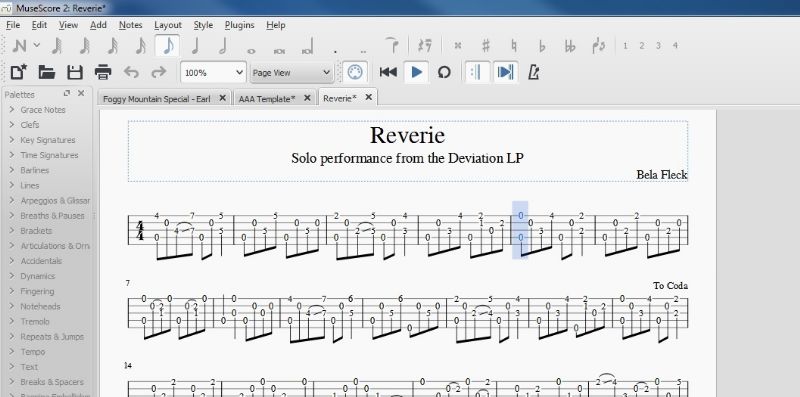
Here is a screenshot of a MuseScore .mxl file while it is playing. Notice the highlighted notes to show where you are at just like TablEdit. Unfortunately the BHO doesn't allow us to upload these types of files at the moment for some reason or another, I wish they would because this is becoming a popular, easy to use and free format for creating and using tabs. The .mxl file is like the .tef file in that it can be used by anyone who has musescore.
Edited by - Mooooo on 07/19/2018 21:34:16
janolov - Posted - 07/19/2018: 22:50:57
For those who think it should be able to upload musescore files in the tab archive, here is a suggestion in the Improvement and Suggestions section: banjohangout.org/topic/340857/. Make your voices heard!
I have no plans to convert to Musescore, but I agree that Musescore files should be able to upload in the tab archive. It should also be a custom to post pdf besides MuseScore and TablEdit.
Peter Vipulis - Posted - 07/20/2018: 03:32:27
Thanks for the input. The note stems have to be adjusted for every measure (pointing up or down), as far as I can find.
One thing I really like about Musescore is that you can make the string lines (the 5 horizontal lines) grey, which helps alot when reading. I couldnt find that in guitarpro and thats a huge reason why I went to TablEdit (can't do that in TablEdit as far as I know, but it just looks cleaner). But you can't make the numbers bold in Musescore, seems like a little thing but its big to me when multiplied over many scores.
Personal preference: if I'm going to spend hours learning a piece, and have an option, I would choose what's easier on the eye. Seems TablEdit looks cleaner to me for now, personal opinion.
TablEdit has 90s menus, and could use a interface upgrade, but I doubt they have the $ resources like Musescore.
Edited by - Peter Vipulis on 07/20/2018 03:41:29
trapdoor2 - Posted - 07/20/2018: 08:29:44
quote:
Originally posted by Peter VipulisBut you can't make the numbers bold in Musescore, seems like a little thing but its big to me when multiplied over many scores.
I believe you can make the numbers bold. It should be under the Staff Properties section, maybe in the advanced subsection. There are 8 different available fonts and I believe you can do the basic italic, bold, etc.
Musescore has a huge amount of 'hidden' capabilities. The handbook only touches on the major ones. I've found that posting a query to the Musescore forum is often the best way to discover the hidden gems. For instance, I wanted to use the notational standard of having the 5th-string stem/flag pointing up (to indicate it is a 5th string note). I searched and searched and finally asked the question. After some back and forth, someone suggested using the symbol pallette...then showed me how to replace every G (open 5th) globally with that symbol. Just a few clicks and I can populate the entire score with those special flags.
Frankly, every time I've found something that seems too far outside the box for Musescore, the forum gurus have shown me the way. This is not to say Musescore is perfect, far from it. They still have a section where you can post a "wish-list" for tasks it cannot currently do.
Mooooo - Posted - 07/20/2018: 08:46:05
quote:
Originally posted by Peter VipulisThanks for the input. The note stems have to be adjusted for every measure (pointing up or down), as far as I can find.
One thing I really like about Musescore is that you can make the string lines (the 5 horizontal lines) grey, which helps alot when reading. I couldnt find that in guitarpro and thats a huge reason why I went to TablEdit (can't do that in TablEdit as far as I know, but it just looks cleaner). But you can't make the numbers bold in Musescore, seems like a little thing but its big to me when multiplied over many scores.Personal preference: if I'm going to spend hours learning a piece, and have an option, I would choose what's easier on the eye. Seems TablEdit looks cleaner to me for now, personal opinion.
TablEdit has 90s menus, and could use a interface upgrade, but I doubt they have the $ resources like Musescore.
Peter, every issue you have brought up has a solution in MuseScore. You just have to make a template of how you want to see your score and save it and use that to make new tabs. It seems that every small problem you can't figure out right away is making you tell us that that's the reason you prefer TablEdit, and when you get the solution, you find another small problem. I would say, why don't you just stick to TablEdit. It seems easier for you, and it is definitely easier not to learn something new than to spend a little time on it. Some people have time and some don't. It's no problem. I have been using it for a year and a half now and I am still discovering new things...good luck.
Peter Vipulis - Posted - 07/20/2018: 09:31:15
Thanks for reading my ramblings. I think it shows what any person would encounter, which is partly what I was trying to show. A youtube tutorial for banjo would probably be a good thing for advocates of it.
Mooooo - Posted - 07/20/2018: 09:57:49
Maybe you can re-read trapdoor's last post and check out the MuseScore Handbook, many of your questions will be answered. MuseScore has a great community of smarty-pants who love to help out.
n1wr - Posted - 07/20/2018: 10:18:21
Been watching this thread with interest.
I would like to add a slightly different angle to it. I admittedly use TablEdit. It seems that for a long time this has been the de facto standard for TABs uploaded to Banjo Hangout. For good reason. Having the TAB in TablEdit allows a lot of flexibility in how the TAB is used for learning. Typically the process goes something like this. Print out the TAB for reference. Learn the first verse (usually 16 or so bars. Play along with the TAB, slowed down at first, then slowly increase the speed. If the TAB has multiple verses sometimes I break it down and re-save it in verses, so I can repeat only the verse I've just learned.
The point of all this - having the TAB in a useful format really helps me. I have even gone to the trouble to take a TAB that I have printed out (e.g. from a pdf) and entered it into TablEdit to make it useful to me. Example Skinner's article in BNL on Reno's All the Way to Reno, from the BNL article to TablEdit.
So - in my opinion, using MuseScore makes no sense. Am I missing something?
And Mike - this in no way takes from your fabulous TABs that you've been posting. I for one would really like to know your process...how are you able to reproduce TABs from recordings with such quality and so quickly? You amaze me!
trapdoor2 - Posted - 07/20/2018: 10:37:48
quote:
Originally posted by n1wrBeen watching this thread with interest.
I would like to add a slightly different angle to it. I admittedly use TablEdit. It seems that for a long time this has been the de facto standard for TABs uploaded to Banjo Hangout. For good reason. Having the TAB in TablEdit allows a lot of flexibility in how the TAB is used for learning. Typically the process goes something like this. Print out the TAB for reference. Learn the first verse (usually 16 or so bars. Play along with the TAB, slowed down at first, then slowly increase the speed. If the TAB has multiple verses sometimes I break it down and re-save it in verses, so I can repeat only the verse I've just learned.
The point of all this - having the TAB in a useful format really helps me. I have even gone to the trouble to take a TAB that I have printed out (e.g. from a pdf) and entered it into TablEdit to make it useful to me. Example Skinner's article in BNL on Reno's All the Way to Reno, from the BNL article to TablEdit.
So - in my opinion, using MuseScore makes no sense. Am I missing something?
I don't think you're missing anything. Musescore is simply a different bit of software than can do exactly the same thing you're doing in TablEdit. It simply is different, takes different keystokes or mouse moves to end up with the same result. I do almost exactly what you do, I will take music from whatever source and input it into Musescore and then play it back in whatever snippet size I want to (Musescore has a "repeat" function that allows repeating anything from a single measure to the whole thing...similar to TablEdit, just different commands). Since I more often start from notation (both TablEdit and Musescore), I key in the notation and generate Tab from that...and then follow the same process.
I initially got Musescore because I needed really clean notation for orchestral strings (violin, viola, cello, etc.). I wasn't really interested in its Tab capabilities. However, now that I've been using the Tab section, I'm liking it more and more. However, if I were using Tab alone (no notation), I think TablEdit might have the upper hand there. I should test Musescore in that application first though. I really don't know and probably shouldn't comment.
phb - Posted - 07/20/2018: 10:57:34
quote:
Originally posted by n1wrSo - in my opinion, using MuseScore makes no sense. Am I missing something?
Yes, a reason for your conclusion. MuseScore can do everything that TablEdit can do. As is common with software alternative, it does quite a few things slightly differently. For this reason it may take some time to get used to. Users of MuseScore undoubtedly would also need some time to adjust to TablEdit. Users who have used neither will probably need the same amount of time to learn how to user either program.
Right now TablEdit users can up and download TablEdit files to the BHO Tab Archive while MuseScore users can't. For this reason an argument can be made that TablEdit is the more useful program to have because you'll find infinitely more TablEdit tabs than MuseScore tabs which, of course, is due to the arbitrary upload restriction imposed by the BHO. Anyone can get the free TEFView program and anyone can get the free MuseScore program. If you want, you can buy TablEdit for money. It's a free world.
The argument here really seems to be what type of icecream is better, chocolate or vanilla. Since I like chocolate, trying vanilla doesn't make any sense. Am I missing something?
Page: 1 2
Terms of Use | Privacy Policy | Privacy Consent (EU/GDPR Only)
Copyright 2026 Banjo Hangout. All Rights Reserved.