DVD-quality lessons (including tabs/sheet music) available for immediate viewing on any device.
Take your playing to the next level with the help of a local or online banjo teacher.
Weekly newsletter includes free lessons, favorite member content, banjo news and more.
Premier Sponsors


|
Please note this is an archived topic, so it is locked and unable to be replied to. You may, however, start a new topic and refer to this topic with a link: http://www.banjohangout.org/archive/344348/2
Page: 1 2
Mooooo - Posted - 07/20/2018: 11:01:08
quote:
Originally posted by n1wrBeen watching this thread with interest.
I would like to add a slightly different angle to it. I admittedly use TablEdit. It seems that for a long time this has been the de facto standard for TABs uploaded to Banjo Hangout. For good reason. Having the TAB in TablEdit allows a lot of flexibility in how the TAB is used for learning. Typically the process goes something like this. Print out the TAB for reference. Learn the first verse (usually 16 or so bars. Play along with the TAB, slowed down at first, then slowly increase the speed. If the TAB has multiple verses sometimes I break it down and re-save it in verses, so I can repeat only the verse I've just learned.
The point of all this - having the TAB in a useful format really helps me. I have even gone to the trouble to take a TAB that I have printed out (e.g. from a pdf) and entered it into TablEdit to make it useful to me. Example Skinner's article in BNL on Reno's All the Way to Reno, from the BNL article to TablEdit.
So - in my opinion, using MuseScore makes no sense. Am I missing something?
And Mike - this in no way takes from your fabulous TABs that you've been posting. I for one would really like to know your process...how are you able to reproduce TABs from recordings with such quality and so quickly? You amaze me!
First of all, thanks for the kind words, I really appreciate it. In response to your post:
If the BHO supported musescore files and you had musescore on your computer you would notice that it is really similar to having the full version of Tabledit and a .tef file. You would just download it the same way, click on it and it would open in MuseScore and then you could play it, change the tempo, change the key if you want, loop as many measures as you want....basically the same thing but it's free and all the other wonderful things already said. I am trying to figure out now which files are the ones to be uploaded since I haven't shared my musescore files with anyone yet. But I have imported some from the MuseScore site without any problems.
@philipp...I like vanilla, with caramel sauce and nuts, in a waffle cup.
Edited by - Mooooo on 07/20/2018 11:07:07
n1wr - Posted - 07/20/2018: 11:09:44
So the bottom line seems to be that we need to convince Eric to support MuseScore files. Any techies out there can shed light on this? I can't imagine that Eric hasn't yet been asked this question!
Mooooo - Posted - 07/20/2018: 11:19:03
quote:
Originally posted by n1wrSo the bottom line seems to be that we need to convince Eric to support MuseScore files. Any techies out there can shed light on this? I can't imagine that Eric hasn't yet been asked this question!
Feel free to join in on the discussion in the improvements section, maybe he gets a kick-back from the TablEdit guy. who knows? I can't imagine adding this program to the supported files being a job that would take more than 10 minutes to complete.
Edited by - Mooooo on 07/20/2018 11:22:58
n1wr - Posted - 07/20/2018: 11:22:01
Has anyone tried to upload a MuseScore file to the BHO Archive?
phb - Posted - 07/20/2018: 13:54:04
quote:
Originally posted by n1wrHas anyone tried to upload a MuseScore file to the BHO Archive?
Yes, this is what happens:
Error(s) Occured:
Your file is not an allowed file type (.mscz). Allowed file types are: bjo,tef,pdf,ptb,gif,tab,txt,jpg,med,gtp,gp3,gp4,gp5,gpx,mid,mp3,bmp
Your file was not saved. Please try again.
I then renamed the MuseScore file from "Salty Dog Blues.mscz" to Salty Dog Blues.tef" and uploaded it without problems. I added a note to the tab description that the .tef is NOT a .tef but needs to be renamed to .mscz after downloading. Not really how it is supposed to be...
Mooooo - Posted - 07/20/2018: 14:24:55
quote:
Originally posted by phbquote:
Originally posted by n1wrHas anyone tried to upload a MuseScore file to the BHO Archive?
Yes, this is what happens:
Error(s) Occured:
Your file is not an allowed file type (.mscz). Allowed file types are: bjo,tef,pdf,ptb,gif,tab,txt,jpg,med,gtp,gp3,gp4,gp5,gpx,mid,mp3,bmp
Your file was not saved. Please try again.
I then renamed the MuseScore file from "Salty Dog Blues.mscz" to Salty Dog Blues.tef" and uploaded it without problems. I added a note to the tab description that the .tef is NOT a .tef but needs to be renamed to .mscz after downloading. Not really how it is supposed to be...
Great Idea
at first it wouldn't open after renaming it. the icon changes to musescore but I get the message
"Cannot read file C:/Users/Mine/Downloads/Salty dog blues.mscz.tef:
unknown type"
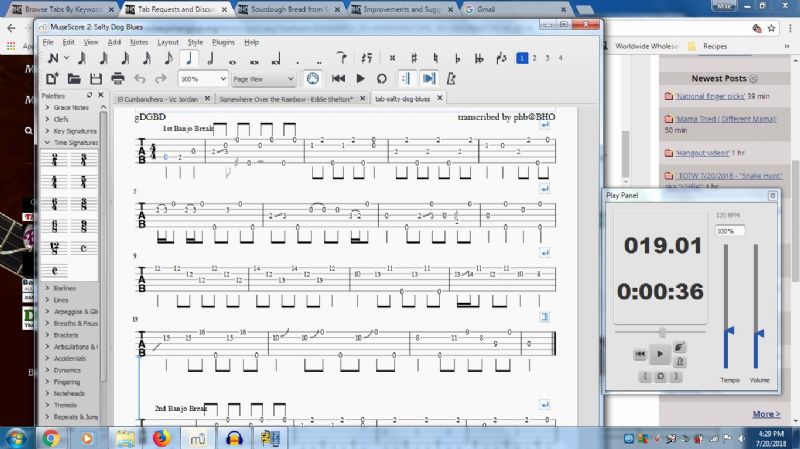
so while on the tab archive page before downloading it, I right clicked on the TablEdit (highlighted in blue) and saved as "All Files" it came out as a Compressed MuseScore File which is pretty cool but needs a bit of cleaning up. Here's a screen shot so Philipp can compare to his tab at home.
Edited by - Mooooo on 07/20/2018 14:35:32
banjo_brad - Posted - 07/20/2018: 14:47:15
I'm a "let's try something new" kind of guy when it comes to software (at one time I had 8" floppy discs for about 14 different language compilers), so I've downloaded the MuseScore program (AND the handbook, can't have too many manuals around) and will look into it. Itook a quick look the other day when I dl's the program and was unable to make heads or tails of it in the few minutes I had to check it out with only that one page pop-up (did I mention I like dead-tree manuals?), I'll get around to looking at the program maybe later this evening.
I see no reason not to make MuseScore usable on the HO, unless there isn't a comparable program like TEFview available.
n1wr - Posted - 07/20/2018: 15:18:16
Let's hope Eric comes to the rescue: banjohangout.org/topic/344710/#4360621
dr4dpet - Posted - 07/20/2018: 15:41:26
quote:
Originally posted by MoooooGreat Ideaat first it wouldn't open after renaming it. the icon changes to musescore but I get the message
"Cannot read file C:/Users/Mine/Downloads/Salty dog blues.mscz.tef:
unknown type"so while on the tab archive page before downloading it, I right clicked on the TablEdit (highlighted in blue) and saved as "All Files" it came out as a Compressed MuseScore File which is pretty cool but needs a bit of cleaning up. Here's a screen shot so Philipp can compare to his tab at home.
In order to check out how this would work for Musescore on a Linux computer, I downloaded the same .tef file.
The name of the received file was tab-salty-dog-blues-23054-4250132072018.tef. I went into my file browser and changed the name to tab-salty-dog-blues.mscz and then double clicked the file. It opened in Musescore and looks identical to the screenshot you posted. (And the tab plays midi as it progresses.) Also I was able to successfully inact a minor edit for testing purposes.
It looks like we have a workaround for posting Musescore files. Steps would be something like this:
Edited by - dr4dpet on 07/20/2018 15:48:02
Mooooo - Posted - 07/20/2018: 15:48:22
quote:
Originally posted by dr4dpetquote:
Originally posted by MoooooGreat Ideaat first it wouldn't open after renaming it. the icon changes to musescore but I get the message
"Cannot read file C:/Users/Mine/Downloads/Salty dog blues.mscz.tef:
unknown type"so while on the tab archive page before downloading it, I right clicked on the TablEdit (highlighted in blue) and saved as "All Files" it came out as a Compressed MuseScore File which is pretty cool but needs a bit of cleaning up. Here's a screen shot so Philipp can compare to his tab at home.
In order to check out how this would work for Musescore on a Linux computer, I downloaded the same .tef file.
The name of the received file was tab-salty-dog-blues-23054-4250132072018.tef. I went into my file browser and changed the name to tab-salty-dog-blues.mscz and then double clicked the file. It opened in Musescore and looks identical to the screenshot you posted. (And the tab plays midi as it progresses.
I am pretty sure Philipp runs on Linux as well, I tried saving a .mscz file as Little Dave.tef and it didn't work, I got a message saying:
"Error(s) Occured:
Your file is not an allowed file type (.mscz). Allowed file types are: bjo,tef,pdf,ptb,gif,tab,txt,jpg,med,gtp,gp3,gp4,gp5,gpx,mid,mp3,bmp
Your file was not saved. Please try again."
My computer adds .mscz to the end and I couldn't take it off...maybe it is easier to trick the computer in Linux
dr4dpet - Posted - 07/20/2018: 15:59:57
quote:
Originally posted by Moooootrapdoor2 have you heard the Kay Banjo soundfont? It's banjo-y, not perfect of course, but I wouldn't want or need it to be, if I want to hear banjo, I pick mine up. If you want to try it, I can dig it up and pass on the link.
Mike,
I promise I am not picking on you. 
I use the Kay Banjo soundfont for most of the tunes I enter into MuseScore. However, I have found it does not have a sample for the low C when the 4th string is tuned down for songs such as Home, Sweet Home. For these I use the Timbres of Heaven soundfont.
What are you doing in this situation?
Mooooo - Posted - 07/20/2018: 16:07:03
quote:
Originally posted by dr4dpetquote:
Originally posted by Moooootrapdoor2 have you heard the Kay Banjo soundfont? It's banjo-y, not perfect of course, but I wouldn't want or need it to be, if I want to hear banjo, I pick mine up. If you want to try it, I can dig it up and pass on the link.
Mike,
I promise I am not picking on you.
I use the Kay Banjo soundfont for most of the tunes I enter into MuseScore. However, I have found it does not have a sample for the low C when the 4th string is tuned down for songs such as Home, Sweet Home. For these I use the Timbres of Heaven soundfont.
What are you doing in this situation?
I am usually just putting up with no sound on the low C notes. I could key-up the entire score a major 2nd interval if I need to hear it. I don't really use the tab to learn songs, I just tab because other people need them. But I have noticed it and thought it was strange...maybe the guy who made the font didn't consider that people wanted to play lower notes with it.
phb - Posted - 07/21/2018: 00:40:30
quote:
my computer adds .mscz to the end and I couldn't take it off...maybe it is easier to trick the computer in Linux
I think in Windows you have to set the file browser to show the file name extensions. Once done a PDF will be shown as "name.pdf" and you can rename the file including the file name extension. This option should be available in the settings or view menu of the file browser. When you do change the file name extension, Windows will show you a warning message. Just hit OK.
Edited by - phb on 07/21/2018 00:42:42
phb - Posted - 07/21/2018: 02:00:22
quote:
Originally posted by Mooooo
Here's a screen shot so Philipp can compare to his tab at home.
Looking at the screenshot, there seems to be a slight incompatibility between your (Windows) version and my (Linux) version of MuseScore. It could also be related to different releases of MuseScore, I don't know (my version is 2.0.2, revision 3543170). In any case when downloading my own file and putting it back into MuseScore it is identical to my original file. The difference between this and your screenshot is that on my computer all stems are downwards. I think I remember that I had to tell MuseScore explicitly to put the stems downwards in the measures where they are upwards on your screenshot. MuseScore put the stems upwards because I had to use the 1st and 2nd voices to get the two notes (the slide on the 3rd string and the open 2nd string) at the same time in those measures and it thought that the stems of one voice should go downwards and those of the other upwards.
Mooooo - Posted - 07/21/2018: 19:25:51
When I export my own mxl file and open it up it needs a bit of cleanup, so I am thinking that the best one to use without regard to whichever other programs work with it is the .mxcz file or .mscx.
TablEdit - Posted - 08/01/2018: 14:36:43
Hi there,
I read this discussion with great interest.
I am very flattered that the.tef format became the official format of BHO but I think there is no reason not to allow Musescore files to be uploaded to the BHO. It should be fairly easy to extend the file extension filter.
It is true that the TablEdit help file is not optimal. For example it doesn't even mention that you can ALSO enter notes in the staff by typing their initial ;-)
The fundamental difference between Musescore and TablEdit is that Musescore derives the tablature from the notation staff while TablEdit calculates the notation staff from the tablature.
As a result IMHO, Musescore is not as comfortable with tablature as TablEdit. And vice versa.
Does Musescore correctly manage the 5th string of the banjo? Does Musescore allow direct tablature editing? To convert a score into a different tuning? Probably but I doubt it would be as simple and natural as TablEdit.
As for the price of TablEdit, given the number of free updates and the number of key reminders we have sent out over the past 20 years, I am not sure that the $60 price is particularly excessive.
Best regards.
n1wr - Posted - 08/01/2018: 14:47:26
TablEdit Matthiew - thanks for chiming in. I am not a MuseScore user, so I can't address most of your questions. Others will.
This conversation went in a couple directions, but for me the most significant was that those that use MuseScore cant upload the standard MuseScore formats to BHO, hence those that use MuseScore have to share them in pdf format, which diminishes their usefulness. It would take a change in the BHO software to allow MuseScore formats to be saved to the archive on here. I'm not sure Eric is in favor of that (the message string on this subject was deleted). So here we are.
By the way I think the $60 I spent on TablEdit was one of the most important, valuable things I've done to help me learn. Thanks!
n1wr - Posted - 08/01/2018: 14:51:29
TablEdit - See also this posting: banjohangout.org/topic/344710/#4360621
Magnus Edring - Posted - 08/11/2018: 16:57:20
I have been using TablEdit for many years and it is a great program. A couple of years ago I switched over to Linux for various reasons (privacy was one of them) . I have not been able to get TablEdit to run well using wine, it works but it won't play midi, not on my systems anyway. So I use Tux Guitar. Also a great and free application. Tried MuseScore and that also works just fine.
It doesn't matter what program you use as long as it works for you and gets the job done. It is my hope that TablEdit will one day come up with a version for Linux.
dr4dpet - Posted - 09/05/2018: 02:15:56
quote:
Originally posted by TablEditHi there,
The fundamental difference between Musescore and TablEdit is that Musescore derives the tablature from the notation staff while TablEdit calculates the notation staff from the tablature.
Does Musescore correctly manage the 5th string of the banjo? Does Musescore allow direct tablature editing? To convert a score into a different tuning? Probably but I doubt it would be as simple and natural as TablEdit.Best regards.
I'm not sure how Musescore derives notation or tablature.
I have created scores by entering standard notation and then copyed that to a tab staff, simply copy the notation and paste to the tab. The G at the top of the treble clef may show up as the first string noted at the seventh fret, but if it does all you have to do is drag it to the 5th string if that is where you are playing the note. I have entered directly to tab and then copied that to standard notation, also copy and paste. There is also an option to have linked tab and staff, you enter into one and the other is automatically completed. You can directly edit both the standard notation and the tab. If they are linked, edits to one change the other.
I'm not sure what you mean by "correctly manage the 5th string." May guess is that it may not -- if you enter the 5th as fretted at the seventh, you are getting the equivalent of the 12th fret on the neck. I've not tried converting a score to a different tuning, yet, so no answer of worth from me on that. It's easy enough to change string data, only a few clicks of the mouse and I can change the tuning from gDGBD to gCGCD, or any other tuning. I'll give a try soon to see the result. As far as transposing from one key to another within the same tuning, it also only takes a few mouse clicks. This I have done.
Page: 1 2
Terms of Use | Privacy Policy | Privacy Consent (EU/GDPR Only)
Copyright 2026 Banjo Hangout. All Rights Reserved.