DVD-quality lessons (including tabs/sheet music) available for immediate viewing on any device.
Take your playing to the next level with the help of a local or online banjo teacher.
Weekly newsletter includes free lessons, favorite member content, banjo news and more.
Premier Sponsors


|
Please note this is an archived topic, so it is locked and unable to be replied to. You may, however, start a new topic and refer to this topic with a link: http://www.banjohangout.org/archive/339981
Dubl-M - Posted - 02/16/2018: 14:10:19
You can input tab in TablEdit software and display a standard score. You can input notes from a score and print/display a tab. The best part is it will also play it for you so you can judge the quality of the tab. Many tabs are just skeletal mnemonics to aid in recalling a tune. TablEdit is available for Windows , Mac, and IOS. I use the Windows version on Linux.
Edited by - Dubl-M on 02/16/2018 14:10:54
Mooooo - Posted - 02/16/2018: 14:25:55
I don't know if this would be easy for you, but if you learn the fretboard very well, you will know the notes, and practice with reading sheet music will make things a lot easier when you want to put tab in musical notation and the other way.
Aschmuckwithstrings - Posted - 02/16/2018: 17:42:25
quote:
Originally posted by Dubl-MYou can input tab in TablEdit software and display a standard score. You can input notes from a score and print/display a tab. The best part is it will also play it for you so you can judge the quality of the tab. Many tabs are just skeletal mnemonics to aid in recalling a tune. TablEdit is available for Windows , Mac, and IOS. I use the Windows version on Linux.
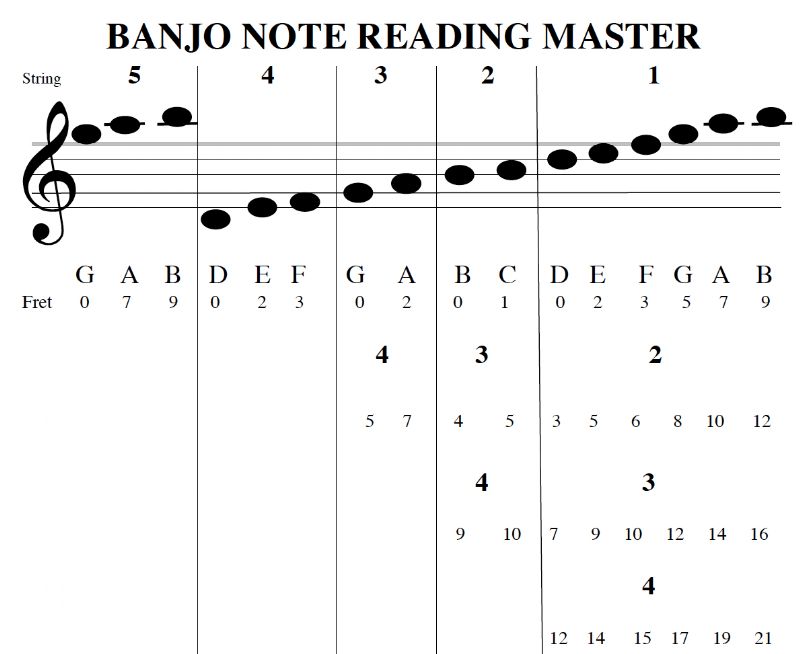
It ain't about the result for me. It's the exercise. My confusion is over which note corresponds to which lines.
Dubl-M - Posted - 02/16/2018: 18:28:49
Going from tab to score is easier, less ambiguity. Both a G fretted @ 4 and an open B land on the same place in the score. It’s one type of exercise to familiarize yourself with the fretboard notes.
Mooooo - Posted - 02/16/2018: 20:02:42
quote:Originally posted by Aschmuckwithstrings
"It ain't about the result for me. It's the exercise. My confusion is over which note corresponds to which lines."
You should find a book for this. It is a great thing to learn this stuff, and will help a lot when you come upon sheet music that you have never heard before. Hopefully you know the notes on the fret board, at least the ones between the fourth and first strings from open to the 5th fret. If not, you should get acquainted with them. I am sure Rick Van P mmuussiiccaall has a chart to help you. The notes on the staff are pretty easy to learn, I am sure you can google this. This knowledge probably won't help you pick any better, but you will definitely learn a lot more about music.Good luck.
dr4dpet - Posted - 02/16/2018: 23:02:19
quote:
Originally posted by Aschmuckwithstringsquote:
Originally posted by Dubl-MYou can input tab in TablEdit software and display a standard score. You can input notes from a score and print/display a tab. The best part is it will also play it for you so you can judge the quality of the tab. Many tabs are just skeletal mnemonics to aid in recalling a tune. TablEdit is available for Windows , Mac, and IOS. I use the Windows version on Linux.
It ain't about the result for me. It's the exercise. My confusion is over which note corresponds to which lines.
Are you looking for something like this?
BTW I do the same thing as Dubl-M using Musescore. It, also, is available for Linux, Mac, and Windows. A difference being that it runs natively on Linux, you do not need an emulator like Wine. I'm currently looking for a soundfont with good banjo samples.
Aschmuckwithstrings - Posted - 02/22/2018: 10:34:18
quote:
Originally posted by dr4dpetquote:
Originally posted by Aschmuckwithstringsquote:
Originally posted by Dubl-MYou can input tab in TablEdit software and display a standard score. You can input notes from a score and print/display a tab. The best part is it will also play it for you so you can judge the quality of the tab. Many tabs are just skeletal mnemonics to aid in recalling a tune. TablEdit is available for Windows , Mac, and IOS. I use the Windows version on Linux.
It ain't about the result for me. It's the exercise. My confusion is over which note corresponds to which lines.
Are you looking for something like this?
BTW I do the same thing as Dubl-M using Musescore. It, also, is available for Linux, Mac, and Windows. A difference being that it runs natively on Linux, you do not need an emulator like Wine. I'm currently looking for a soundfont with good banjo samples.
Thank you!
Mooooo - Posted - 02/22/2018: 12:56:46
quote:
Originally posted by dr4dpetquote:
Originally posted by Aschmuckwithstringsquote:
Originally posted by Dubl-MYou can input tab in TablEdit software and display a standard score. You can input notes from a score and print/display a tab. The best part is it will also play it for you so you can judge the quality of the tab. Many tabs are just skeletal mnemonics to aid in recalling a tune. TablEdit is available for Windows , Mac, and IOS. I use the Windows version on Linux.
It ain't about the result for me. It's the exercise. My confusion is over which note corresponds to which lines.
Are you looking for something like this?
BTW I do the same thing as Dubl-M using Musescore. It, also, is available for Linux, Mac, and Windows. A difference being that it runs natively on Linux, you do not need an emulator like Wine. I'm currently looking for a soundfont with good banjo samples.
I am also using MuseScore...are you saying that you can change the sound the sound of the tab to be more banjo-like with by sampling one? Let me know if you solve this problem. Maybe you have solved the fretted 5th string disaster, if so, let me know.
Thanks, Mike
Sorry for going off topic.
dr4dpet - Posted - 02/23/2018: 00:18:40
quote:
Originally posted by Moooooquote:
Originally posted by dr4dpet...I'm currently looking for a soundfont with good banjo samples.I am also using MuseScore...are you saying that you can change the sound the sound of the tab to be more banjo-like with by sampling one? Let me know if you solve this problem. Maybe you have solved the fretted 5th string disaster, if so, let me know.
Thanks, Mike
Sorry for going off topic.
I know this is still off topic, but a search didn't show me a thread where to add this.
Yes, so far I am using this soundfont, FS Kay 5-String Banjo It is not ideal, yet a clear improvement and only a small 8.7 mb download. See this and this on how to install and use soundfonts. It is actually only the banjo part of a larger soundfont, but was all I needed. I have yet to do more searching due to limited bandwidth from home. Musescore has a list of suggested soundfonts on the page I linked about installing soundfonts. I will try the Timbres of Heaven as my next go. (I would think Tabledit has similar capabilities.)
Regarding the fifth string, do you mean as when you capo / spike it while leaving the rest of the strings open, like aDGBD ?
Mooooo - Posted - 02/23/2018: 00:28:57
quote:
Originally posted by dr4dpetI know this is still off topic, but a search didn't show me a thread where to add this.
Yes, so far I am using this soundfont, FS Kay 5-String Banjo It is not ideal, yet a clear improvement and only a small 8.7 mb download. See this and this on how to install and use soundfonts. It is actually only the banjo part of a larger soundfont, but was all I needed. I have yet to do more searching due to limited bandwidth from home. Musescore has a list of suggested soundfonts on the page I linked about installing soundfonts. I will try the Timbres of Heaven as my next go. (I would think Tabledit has similar capabilities.)
Regarding the fifth string, do you mean as when you capo / spike it while leaving the rest of the strings open, like aDGBD ?
Thanks for the soundfont and the instructions to install them, I really appreciate it.
As to the 5th string, I am hoping to be able to have the open string play the g note and when fretted on the 7th fret to play the a note instead of 7 frets from the open 'g' which would be that high d note. I would have to enter 2 in order to get that 'a' note in open G tuning.
Mooooo - Posted - 02/23/2018: 00:48:44
Just installed the soundfont, sounds great dr4dpet. Thanks again
dr4dpet - Posted - 02/23/2018: 01:09:26
quote:
Originally posted by MoooooThanks for the soundfont and the instructions to install them, I really appreciate it.
As to the 5th string, I am hoping to be able to have the open string play the g note and when fretted on the 7th fret to play the a note instead of 7 frets from the open 'g' which would be that high d note. I would have to enter 2 in order to get that 'a' note in open G tuning.
I know how to capo all of the strings at once: Style > General > Chord Symbols, Fretboard Diagrams > Capo. And how to change the tuning on one string only, like for the aDGBD tuning. For that I right click on the tab staff > Staff Properties > Edit String Data, select the 5th string, > Edit String and change it from G4 to A4. But neither of these do what you are seeking. I recently started reading the handbook but am only 2/3 of the way through, maybe I'll find something useful.
Edited by - dr4dpet on 02/23/2018 01:10:02
dr4dpet - Posted - 08/10/2018: 12:18:40
I learned some more about tabbing with Musescore this week. Mooooo may have stated this before and I just missed his meaning.
Most often I start a piece with linked staves of tab and notation, the notation being entered automatically as I add notes to the tab. I will then go back and add chord symbols at the changes, the chord letter appears between the staves. If the tune I am tabbing calls for a capo I will put that in the header along with the tuning; something like -- capo 2, gDGBD. After that, I will then go into the menu and do as I stated in the previous post: "Style > General > Chord Symbols, Fretboard Diagrams > Capo"
This does very little. In fact all it does is change the chord symbol between the staves, If it was initially G, it becomes G(F). I had noticed this change on earlier tunes and would therefore enter the chord as heard -- A, which would then become A(G), the chord heard and the chord fretted below the capo. The tab did not change, but I didn't expect it to. I rarely use the midi playback and just now noticed that the playback didn't change pitch. Noticing this I checked the rest of the transcription closer and saw that the standard notation didn't change to reflect the notes heard when played capoed. 4th string open would be G in the standard notation and remain so when I applied the Capo setting from the menu.
I spent some time reading the Musescore forums and the site the developers have for issues and bugs to find that the setting, for the time being, only does as I have observed. Some of the devs are working on additional features for the capo setting, either as a core function or as a plugin.
In the meantime I think I have a way to have the playback sound as I intend and for the notation to show the notes as they are heard when capoed as indicated. I will create the tab as I have before, unlink the tab and notation, transpose the notation the proper number of semitones and proceed as before. If I choose to use the playback of the midi, I will mute either the tab or the notation (probably the tab).
Mooooo - Posted - 08/10/2018: 12:40:33
dr4dpet, I can't help too much with linking tab and standard notation, since I don't do it. I have taken Std Notation and copied and pasted it onto tab and it shows the computer's choice of which strings to use though.
Mooooo - Posted - 08/10/2018: 13:00:40
I still think the most useful and educational way to change tab into sheet music is to learn the fretboard and practice putting notes into standard notation. This will help a lot with sight reading and eventually writing standard notation will become second nature.
lode - Posted - 08/26/2018: 08:04:41
@dr4dpetI
Changing the tab (and music) lines by retuning with a capo in Musicscore use te menu : "Notes" > "Transpose" > Transpose Chromaticaly" > (on the right) change G major => A major > (on the left) mark UP. And then press OK.
Now the tabs, music-notes, chord symbols are changed all together. Hope I could help.
Lode.
Joel Hooks - Posted - 08/27/2018: 13:31:22
quote:
Originally posted by Moooooquote:Originally posted by Aschmuckwithstrings
"It ain't about the result for me. It's the exercise. My confusion is over which note corresponds to which lines."
You should find a book for this. It is a great thing to learn this stuff, and will help a lot when you come upon sheet music that you have never heard before. Hopefully you know the notes on the fret board, at least the ones between the fourth and first strings from open to the 5th fret. If not, you should get acquainted with them. I am sure Rick Van P mmuussiiccaall has a chart to help you. The notes on the staff are pretty easy to learn, I am sure you can google this. This knowledge probably won't help you pick any better, but you will definitely learn a lot more about music.Good luck.
For banjo specific notation there are many books available. The easiest one to get your hands on a hard copy of is Mel Bay's Banjo Method by Frank Bradbury. I used to be down on this book but after really diving into it I have grown quite fond of it.
It not only teaches reading for 5 string banjo but goes into detail about chord construction and inversions. Also how to play from a piano score. This is still in print but you can pick up copies for +/- $5 on ebay, etc..
There are many books available in PDF for free download that cover much of the same material but perhaps not as clear or broken down. "The Banjo and How to Play it" by Emile Grimshaw is pretty good. Bradbury wrote a book in the late 1920s that is the Mel Bay book time 50-- it gets advanced pretty quick and goes over my head. Still, worth the price of a free download.
I recommend the Mel Bay book but if you insist no not paying for something then make sure the instruction books you get are for "C Notation" or "English System Notation." These will be written with the banjo "tuned" to current concert pitch of g C G B D ("standard tuning"). If the book shows the natural key of the banjo in A or with three sharps then keep looking. That is a different conversion,
Grimshaw's book, the early Bradbury book, as well as many others can be found here...
classic-banjo.ning.com/page/tutor-books
They will all teach the same basic info on reading notation for banjo. They will also include some fantastic techniques that are often ignored today that any banjoist could use to improve.
(BTW, don't let the name "classic banjo" bother you. Some people confuse that with "classical" and are disappointed to find little to no "classical music." You might not want to play that "style." but the info on reading is solid and true. There are also tens of thousands of public domain banjo solos published in notation that you could play if you wanted to.)
dr4dpet - Posted - 08/27/2018: 22:23:11
quote:
Originally posted by lode@dr4dpetI
Changing the tab (and music) lines by retuning with a capo in Musicscore use te menu : "Notes" > "Transpose" > Transpose Chromaticaly" > (on the right) change G major => A major > (on the left) mark UP. And then press OK.
Now the tabs, music-notes, chord symbols are changed all together. Hope I could help.
Lode.
Yes, thank you. I was able to successfully correct my version of Salt Creek with just a few clicks.
That is pretty much what I was explaining in the last paragraph of my post jsut a couple up from yours. I did add an extra step I had to go through since the tunes I have already generated each have a tab linked to standard notation.
Terms of Use | Privacy Policy | Privacy Consent (EU/GDPR Only)
Copyright 2026 Banjo Hangout. All Rights Reserved.