


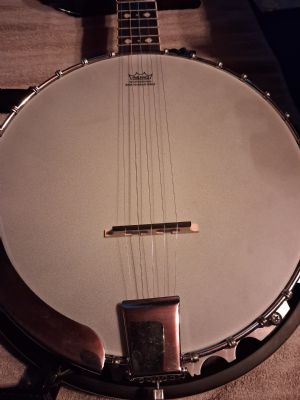
The banjo sounds good enough for the price point. But I'm trying to make improvements. Is this tailpiece being crooked effecting enough to warrant replacement. And if so why is it crooked in the first place?

quote:
Originally posted by pkcconstrictorsThe banjo sounds good enough for the price point. But I'm trying to make improvements. Is this tailpiece being crooked effecting enough to warrant replacement. And if so why is it crooked in the first place?

I'm trying to upload photos but its not working
Loosen your strings a little and straighten it up. It looks like it’s leaning to one side a little. I’m not sure from your pic but it does look like it needs to slide over toward to tremble side just a smidge . Best of luck
I was looking at the tail piece. Check that too
I was thinking the same thing. I have done a string change since, but it is still the same.
Also if we are talking about the bridge I have yet to fine tune that. But it is obvious that that tailpiece is crooked.
This?
That little bit of tailpiece tilt on this type of banjo seems insignificant to me. I can't imagine what effect it would have on the sound. If it doesn't stay in place when you move it, don't worry.
To add a photo from your Hangout "Media" section to a forum post, scroll down below the message compostion window until you see the "Attachments" area. This is where thumbnail links to your personal Hangout media live. There are tabs for the four media types. Fortunately, "Photo" is pre-selected. Simply click on the thumbnail of the photo you want to attach to your post. Now, here's the thing: You will not see the photo appear in your draft message. It will appear in the "Your Attachments" section below the "Attachments" section, so you'll know which photo(s) you've attached. If you want to see how it will look in your actual forum post, click "Preview" just below the message compostion window. Close the Preview to get back to writing your post, or to post it.
How did I put your photo in my post? I went to your media section, copied the link to your photo, and pasted it here.
Those tailpieces often get a little bit crooked in appearance because they only have a single contact point with the pot which almost INVITES tilting. Depending on the unevenness of the string tension pulling on the tailpiece, it can therefore tilt to one side or the other. It really shouldn't effect the sound.
Don't be afraid to just use your hand strength to twist the tailpiece to a more pleasing "straight-plumb" orientation. Sometimes that's all it takes. Do this while strings are tuned up to pitch.
Good luck.
quote:
Originally posted by Old HickoryThis?
That little bit of tailpiece tilt on this type of banjo seems insignificant to me. I can't imagine what effect it would have on the sound. If it doesn't stay in place when you move it, don't worry.
To add a photo from your Hangout "Media" section to a forum post, scroll down below the message compostion window until you see the "Attachments" area. This is where thumbnail links to your personal Hangout media live. There are tabs for the four media types. Fortunately, "Photo" is pre-selected. Simply click on the thumbnail of the photo you want to attach to your post. Now, here's the thing: You will not see the photo appear in your draft message. It will appear in the "Your Attachments" section below the "Attachments" section, so you'll know which photo(s) you've attached. If you want to see how it will look in your actual forum post, click "Preview" just below the message compostion window. Close the Preview to get back to writing your post, or to post it.
How did I put your photo in my post? I went to your media section, copied the link to your photo, and pasted it here.
Thank you
Terms of Use | Privacy Policy | Privacy Consent (EU/GDPR Only)
Copyright 2026 Banjo Hangout. All Rights Reserved.


