
DVD-quality lessons (including tabs/sheet music) available for immediate viewing on any device.
Take your playing to the next level with the help of a local or online banjo teacher.
Weekly newsletter includes free lessons, favorite member content, banjo news and more.
Premier Sponsors


|
Please note this is an archived topic, so it is locked and unable to be replied to. You may, however, start a new topic and refer to this topic with a link: http://www.banjohangout.org/archive/404820
mike gregory - Posted - 08/27/2025: 20:56:51
TRYING to get Mary's laptop to print on an HP 2652 printer.
Wasted about 45 minutes.
Bought SOMETHING for $9.99 which was supposed to update the driver, but still can't get it to work.
Clicked on something else, which said to find the printer in the footer of the browser.
I have NO IDEA what that is!
Tried putting the printer name & number in the searchbox at the bottom of the screen, and up came ads to BUY an HP 2652.
So, on my Lenovo laptop, what does the footer of the browser LOOK like, and where on the screen IS it?
Edited by - mike gregory on 08/27/2025 20:57:54
pinenut - Posted - 08/27/2025: 21:07:25
Hi Mike,
Usually printers don't require $$ for drivers... HP likes to get you with the ink/toner.
Interesting, is that thing Wireless only?
Is it linked to the local WiFi yet?
Once it is linked to the WiFi; push the windows key and search "add a printer"...
support.hp.com/us-en/product/s.../15787933
h10032.www1.hp.com/ctg/Manual/...41677.pdf
h10032.www1.hp.com/ctg/Manual/...39290.pdf
h10032.www1.hp.com/ctg/Manual/...40504.pdf
Edited by - pinenut on 08/27/2025 21:13:42
mike gregory - Posted - 08/28/2025: 03:28:15
It's wired right in.
But, I'll follow your link, try wireless, see if that works.
Thanks.
BobbyE - Posted - 08/28/2025: 05:38:14
Mike,
Right click the Windows icon at bottom of screen, (it is on mine, look for four blue squares forming a square), then click 'settings,' In settings, click, 'bluetooth and devices. From there select, 'printers,'
When printers open see if your model number is already showing. If not, select, 'add printer,' and put model number in there. This is all from Windows 11 but even if yours is not, should be something similar. Your computer should automatically add any drivers needed to get the two devices to communicate. Just work through the 'printers,' area and hopefully you can get the two working. You can also 'Google,' that printer number and a few links down the page, you will see an HP link regarding that model number offering some tech help as well.
Good luck.
Bobby
Edited by - BobbyE on 08/28/2025 05:41:36
maxmax - Posted - 08/28/2025: 11:27:26
I feel like everything technology-wise is getting easier and easier, except printers!
pinenut - Posted - 08/28/2025: 12:41:41
quote:
Originally posted by mike gregoryIt's wired right in.
But, I'll follow your link, try wireless, see if that works.
Thanks.
What is it wired to?
What type of cable?
Laurence Diehl - Posted - 08/28/2025: 12:51:20
quote:
Originally posted by pinenutquote:
Originally posted by mike gregoryIt's wired right in.
But, I'll follow your link, try wireless, see if that works.
Thanks.What is it wired to?
What type of cable?
I would assume ethernet.
Might need to add the printer. On my Win 11: Settings=> Bluetooth and Devices => Printers & Scanners=> Add Device.
Disclaimer - I'm a programmer, I don't really do printers, that's ops.
mike gregory - Posted - 08/28/2025: 13:02:05
cable looks like this
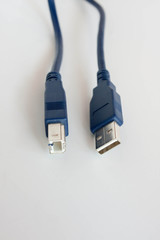
They're right next to each other.
I shall carry THIS computer into the same room as HER computer, and follow the instructions on this thread.
pinenut - Posted - 08/28/2025: 13:03:01
quote:
Originally posted by Laurence Diehlquote:
Originally posted by pinenutquote:
Originally posted by mike gregoryIt's wired right in.
But, I'll follow your link, try wireless, see if that works.
Thanks.What is it wired to?
What type of cable?
I would assume ethernet.
Might need to add the printer. On my Win 11: Settings=> Bluetooth and Devices => Printers & Scanners=> Add Device.
Disclaimer - I'm a programmer, I don't really do printers, that's ops.
Laurence,
I was asking because when I skimmed the instructions it looks like this model group only has USB and WiFi wireless.
But, you never know Mike's printer might be the one model in the group that has an ethernet port.
I think he has it plugged into a USB port on the laptop. It should prompt him to connect as soon as it gets plugged in. Worst case, go to "add a printer" and say yes to whatever Windows wants.
Otherwise page the WiFi, acknowledge at the router and connect the printer to the network then "add a printer" at the laptop.
...Right?
Edited by - pinenut on 08/28/2025 13:04:13
pinenut - Posted - 08/28/2025: 13:08:28
quote:
Originally posted by mike gregorycable looks like this
They're right next to each other.
I shall carry THIS computer into the same room as HER computer, and follow the instructions on this thread.
Mike,
That's USB; one end is USB-a and the other is USB-b. "Should" link up easy...
Edited by - pinenut on 08/28/2025 13:19:44
Elmo_Smiley - Posted - 08/28/2025: 16:34:50
Speaking from years back, not sure it is the same situation, I fixed most of my printer problems with a new printer. Let me explain; at the time, ink was so expensive that buying ink refills, even generic, cost more than just replacing the printer. I know they probably come with a limited supply,
but still, when you can just buy another cheaper than the ink refills...
I'm using two printers. An HP Deskjet 5252 wireless, that even turns itself on when you send a print, and a Canon PIXMA something or other. The HP installed itself as a device on my network, and then my computer found the new device, no problem. The Canon is a nightmare. It shuts down and you have to manually turn it on - I think I found the setting to fix that, but it drops off the network constantly. The HP is the way to go for a wireless network printer. I hope you can get it to work. If it is wireless, see if you can get it to set up to the network, wired or not. Then go from there.
donc - Posted - 08/28/2025: 20:05:42
I had a stupid issue with my HP 3850 printer. The long story short is that my only printer was listed twice in my computer. As soon as I removed 1 of them the problem was solved.
mike gregory - Posted - 08/29/2025: 18:24:03
Mary has GIVEN UP on trying to get the 2652 printer to work!
Since a different printer is available for $40, she ordered that.
MEANWHILE, over on MY computer, I plugged the thumb drive with the 59 page document she wants printed, into MY computer, printed one of my OWN documents to make sure MY printer was doing its job, and MY document came out crisp and bright.
Tried print HER document, and NOTHING.
MY printer is a HP Deskjet 2752e
So, tried a BUNCH of stuff, INCLUDING removing and reinstalling.
When I tried reinstalling, I could not find the 2752e on the list, so I asked the computer to search the INTERNET for how to install it.
Got to a site, downloaded a thing, opened it up, and it gave a swirly thing, with "searching for printer".
That was at 6:11 PM.
It is now 8:30 PM, and the damned thing is still swirling.
WHY would HP corp DO this to a loyal customer??
pinenut - Posted - 08/29/2025: 20:00:01
Mike, I have worked with several of the guys in the HP printer division. They are smart, fun and engaged people. I've asked them similar questions. They don't know either.
On the plus side, the HP printers that I have used are great performers once they get linked up and the ink is paid for...
Terms of Use | Privacy Policy | Privacy Consent (EU/GDPR Only)
Copyright 2026 Banjo Hangout. All Rights Reserved.


