DVD-quality lessons (including tabs/sheet music) available for immediate viewing on any device.
Take your playing to the next level with the help of a local or online banjo teacher.
Weekly newsletter includes free lessons, favorite member content, banjo news and more.
Premier Sponsors


|
Please note this is an archived topic, so it is locked and unable to be replied to. You may, however, start a new topic and refer to this topic with a link: http://www.banjohangout.org/archive/362431
vorvick - Posted - 03/25/2020: 13:15:30
I couldn't find this in janolov's Index to Tabledit Questions so here goes
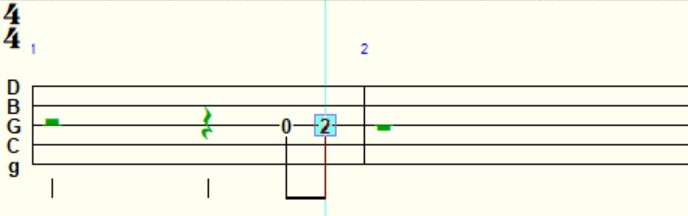
To create a pickup measure go to measure 1 of your piece and enter the appropriate notes at the appropriate place in the measure. In this example pictured below I have placed two eighth notes starting on beat four.
Note that rests are inserted for the first three beats. They are green in this example because I've picked the option "show rests in tablature." If you haven't picked this option, they would be grayed out. In either case, these show up in Print Preview and I'm pretty sure they would be printed too.
Also note that if you created a reading list starting on measure 1, the piece would play back starting on beat one of that measure rather than at the pickup on beat three.
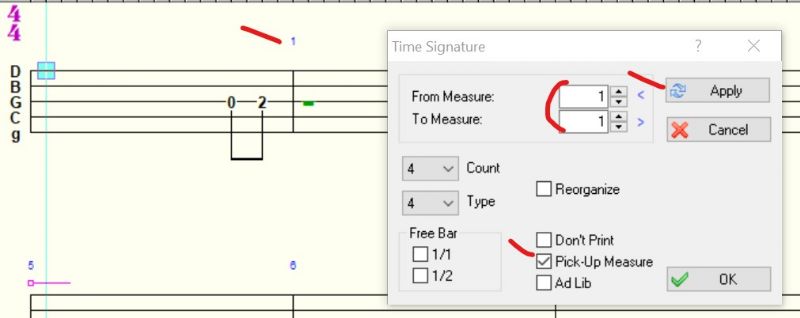
To fix all this, select measure 1 and go to Score > Time Signature
Then, as in the second example below, choose:
From Measure: 1
To Measure: 1
Click the Pick-up Measure check box (placing a check mark in it)
Click Apply
Aside, for Reading List:
Also note that measure 1 is now AFTER the pickup measure. This creates a problem in the Reading List since it still recognizes the pickup measure as #1, and the measure marked as "number 1" is recognized as the second measure. If anyone knows a fix for this I'd like to know!
banjo_brad - Posted - 03/25/2020: 14:00:21
You can also set the pick-up measure without first entering notes in measure one.
Note: In the new Tabledit3, the numbering does not skip the pick-up measure, so if you can make your reading list much easier since you don't have to remember to add or subtract a digit from your counting.
vorvick - Posted - 03/25/2020: 14:32:22
Thanks Brad. When i click on Help > Check for updates... in Tabledit, it says that 2.78 b1 is the most recent version. How did you get 3.x?
Edited by - vorvick on 03/25/2020 14:40:46
janolov - Posted - 03/25/2020: 23:45:26
quote:
Originally posted by vorvickThanks Brad. When i click on Help > Check for updates... in Tabledit, it says that 2.78 b1 is the most recent version. How did you get 3.x?
Goto tabledit.com/secured/. You must have your login username and password (you got them when you bought TablEdit)
banjo_brad - Posted - 03/26/2020: 11:10:30
Be aware that version 3 is very different from 2.78, and can cause problems with your existing tabs.
Be sure to check out the users group that used to be on Yahoo but has moved. There is a lot of information there.
vorvick - Posted - 03/26/2020: 12:28:22
THANKS Banjo Brad, I can put up with the reading list thing for a few more tabs before I make that leap!
Terms of Use | Privacy Policy | Privacy Consent (EU/GDPR Only)
Copyright 2026 Banjo Hangout. All Rights Reserved.