DVD-quality lessons (including tabs/sheet music) available for immediate viewing on any device.
Take your playing to the next level with the help of a local or online banjo teacher.
Weekly newsletter includes free lessons, favorite member content, banjo news and more.
Premier Sponsors


|
Please note this is an archived topic, so it is locked and unable to be replied to. You may, however, start a new topic and refer to this topic with a link: http://www.banjohangout.org/archive/349102
Richard Hauser - Posted - 12/12/2018: 19:36:28
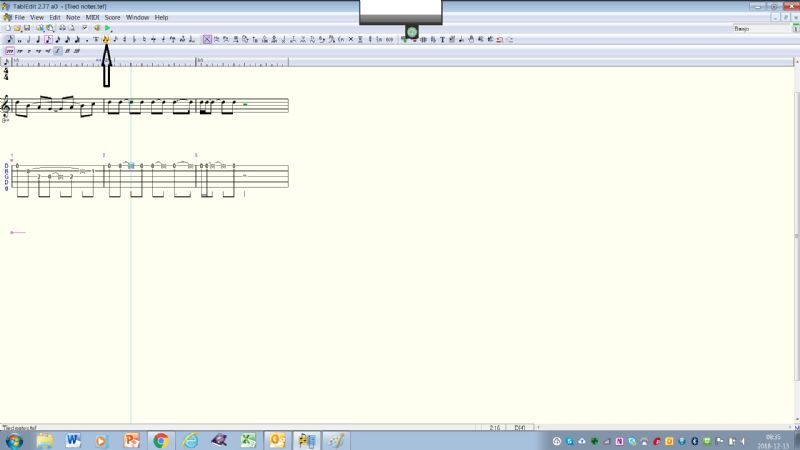
I am creating tab for tune and decided to use "tied" notes instead of using a quarter note for two tied eighth notes. When I tried to use "NOTES > TIES" nothing happens. But when I do the same thing with something else, say triplets, the option becomes highlighted. I also tried to create a tie using the hotkey "L". No luck there either.
Are ties allowed for tabs ? The option is available in "NOTES", but can't seem to be activated.
Thanks in advance for any info -
janolov - Posted - 12/12/2018: 23:19:33
I have no problems with tied notes. To tie two notes in the tablature they have to be on the same fret. Put the cursor on the last of the notes and choose the tie command (I use the "tie icon" in the Note Palette
In the TablEdit the second of the notes becomes within brackets [ ] but on the printout and pdf the "bracketed" notes are not shown.
There may be some settings necessary but I have not discovered anything about ties in the Options menu?
Edited by - janolov on 12/12/2018 23:38:53
janolov - Posted - 12/13/2018: 07:12:23
quote:
Originally posted by kmwatersUninstall and reinstall tabledit.
Uninstalling and reinstalling is often a good way when there are problems. Sometimes I wish I could uninstall and reinstall myself....
lature - Posted - 12/13/2018: 10:07:16
The problem with uninstalling yourself is you have very little control over the reinstall process. You may be reinstalled as a rat. The trees tried this years ago and most are living unfulfilling lives a soy beans right now.
Edited by - lature on 12/13/2018 10:09:05
mmuussiiccaall - Posted - 12/13/2018: 11:24:07
I believe you can only tie one note of the time. You might be selecting multiple notes.
Richard Hauser - Posted - 12/19/2018: 07:39:26
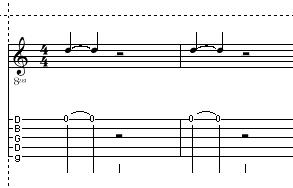
I found my problem. In Tabledit, the symbol for a "tie" is a bracket. In standard music notation a "tie" is about the same as 2 slurred notes. Not so in Tabledit.
MickG - Posted - 12/19/2018: 09:41:52
To have Tabledit to display tied notes using an arc: in Options, Printing, check the boxes for "Tied Notes in Tablature, and the box to the right of it "and Fret Numbers". If these boxes are not checked a tied note shows up only as a bracketed note in tab.
Edited by - MickG on 12/19/2018 09:42:45
Terms of Use | Privacy Policy | Privacy Consent (EU/GDPR Only)
Copyright 2026 Banjo Hangout. All Rights Reserved.