DVD-quality lessons (including tabs/sheet music) available for immediate viewing on any device.
Take your playing to the next level with the help of a local or online banjo teacher.
Weekly newsletter includes free lessons, favorite member content, banjo news and more.
Premier Sponsors


|
Please note this is an archived topic, so it is locked and unable to be replied to. You may, however, start a new topic and refer to this topic with a link: http://www.banjohangout.org/archive/330289
michaelws - Posted - 04/28/2017: 14:22:27
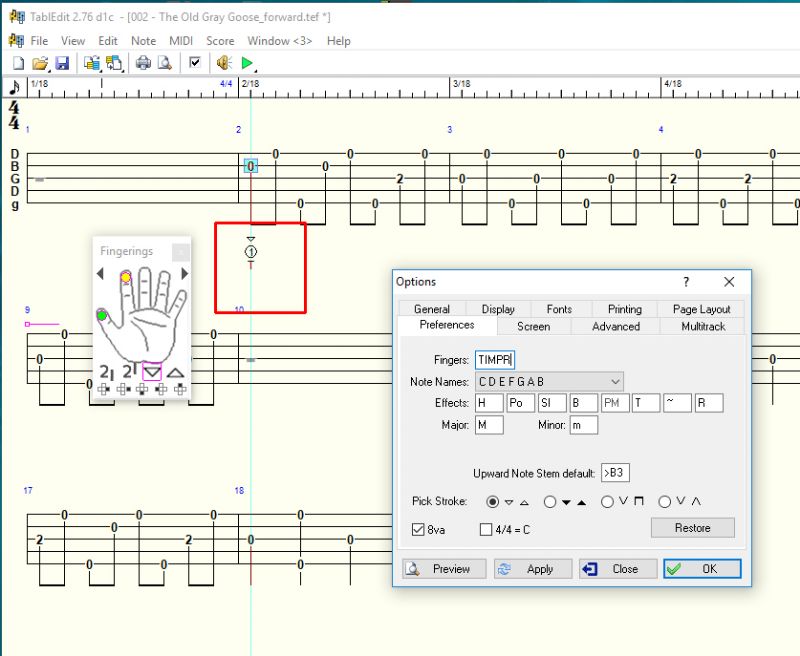
I have another problem with Tabledit. I want to get the fingering to be TIMPR. The manual allows me to change it and i have as shown in my pic attached. But I cannot figure out how to get just those initials to appear. And I am lost as to why the T appears below when I have clicked the index finger on the diagram. the Thumb has a green circle on it and I did not click it. I want to get rid of the numbers above the letters. Right now the attached pic shows a 1 and a T below that. I just want an I to appear there. so i am lost. Googling it shows me older preference windows.
Thanks for any help on this.
banjo_brad - Posted - 04/28/2017: 15:31:19
Join the Tabledit User forum: groups.yahoo.com/neo/groups/TablEdit/info , Matthieu is the author of Tabledit and set this forum up to answer questions, take requests, and provide a place for feedback.
trapdoor2 - Posted - 04/28/2017: 17:35:59
The fingering type is dependent on whether you right-click or left-click (I'm working from memory). One will give you the letter and the other will give you a circled number/letter.
* just tested that. Yup, right click is the good one.
Edited by - trapdoor2 on 04/28/2017 17:38:09
michaelws - Posted - 04/28/2017: 17:53:27
Wow...that simple. YES!!! Works like a charm. Thank you. I put in to join the Yahoo group. Thanks for the help folks.
trapdoor2 - Posted - 04/28/2017: 17:57:25
Here's what it says in the manual: tabledit.com/help/english/palettes.shtml
michaelws - Posted - 04/30/2017: 13:08:30
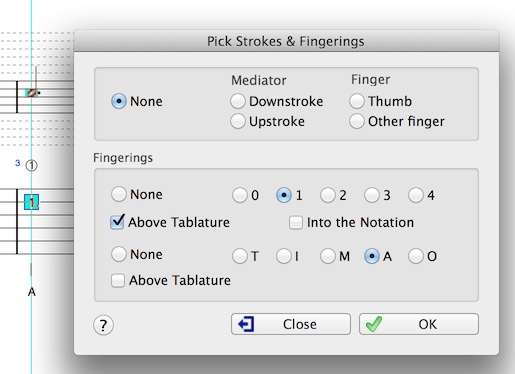
How about adding left hand (fretting) finger positions. The manual shows that you can click or check "Into the notation" but I do not see it anywhere under options>preferences. I would like to add some fretting finger symbols above if possible.
janolov - Posted - 04/30/2017: 22:33:10
quote:
Originally posted by michaelws
How about adding left hand (fretting) finger positions. The manual shows that you can click or check "Into the notation" but I do not see it anywhere under options>preferences. I would like to add some fretting finger symbols above if possible.
Goto "Note" and Choose "Pick strokes + Fingering".
michaelws - Posted - 04/30/2017: 22:54:16
Thanks janolov! When I do that it takes away the picking finger initials below the tab. is it possible to have fretting fingers above and picking fingers below?
Edited by - michaelws on 04/30/2017 22:58:19
Terms of Use | Privacy Policy | Privacy Consent (EU/GDPR Only)
Copyright 2026 Banjo Hangout. All Rights Reserved.