


|
rudy |
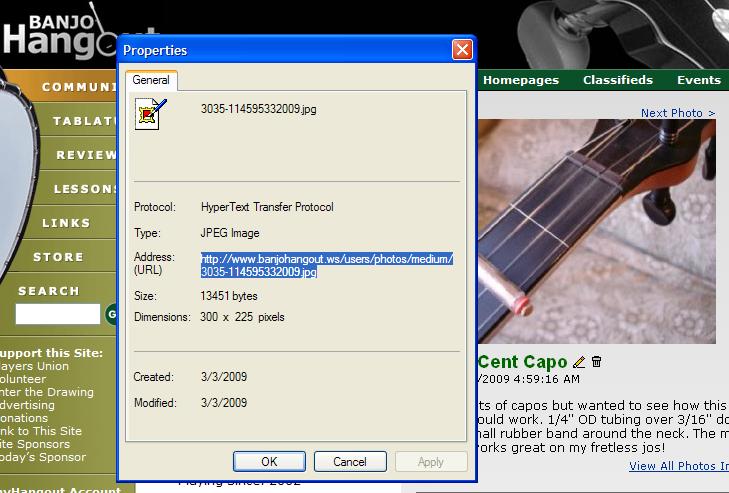
1. Select the image you desire to add to a thread. 2. Right click PC mouse and select "Properties". 3. Highlight the URL as shown. 4. Right click (PC) and select COPY. 5. Select "Reply to topic" at the bottom of thread. 6. Select the "Insert Image" from the top icons. 7. Right click (PC) and PASTE your captured URL between the brackets. 8. You're done!
Be the first to comment on “Adding image to discussion”
You must sign into your myHangout account before you can post comments.
Copyright Notice:
The Banjo Hangout myHangout photo albums were created to allow members to post photos which 1) they own the copyrights to, or 2) which are non-copyrighted. Please respect others by not posting their copyrighted images. Photos posted in violation of this notice may be removed by the webmaster without prior notice, and may result in a locking of your myHangout account. Read complete copyright policy.
Terms of Use | Privacy Policy | Privacy Consent (EU/GDPR Only)
Copyright 2026 Banjo Hangout. All Rights Reserved.
